리뷰용 Docs를 열어 두면, 예전에 셀 메모처럼 적어 두던 피드백이 문서 밖 티켓으로만 남는 날이 있습니다. 사람이 UI에서 댓글을 다는 흐름은 익숙한데, 내부 도구가 같은 자리에 스레드를 남기려면 Drive Activity나 별도 쪽지로 우회하던 기억이 납니다. 오늘은 그 우회를 접고, 2026년 9월 30일 Workspace Updates에 올라온 Programmatic comment and suggestion support now available in the Google Docs, Sheets, and Slides APIs만 남깁니다. Docs·Sheets·Slides 각각에 댓글을 다는 API와, Docs에서만 열리는 제안(suggested edits) 경로, 그리고 응답에 붙는 commentUpdateState를 같이 적습니다.
2026-10-01 점심에 Updates와 개발자 문서 Work with comments and suggestions(Docs, as-fetched), Manage comments(Sheets, as-fetched), Manage comments(Slides, as-fetched)를 나란히 읽었습니다. Updates는 제품 발표 문장이고, 개발자 가이드는 batchUpdate 요청 이름과 읽기용 쿼리 파라미터를 풀어 줍니다. 아래에서 UI 라벨을 지어내지 않고, 문서에 나온 요청·필드 이름만 씁니다.
Programmatic comment support within the Docs, Sheets, and Slides Model Context Protocol (MCP) servers remains in developer preview in accordance with the preview status of the MCP servers.
Updates가 열어 둔 범위
Updates Key capabilities는 세 줄로 나눕니다. Docs API: Programmatically add, review, and reply to comments, and submit proposed text changes as suggestions. Sheets API: Programmatically add, review, and reply to comments on specific cells. Slides API: Programmatically add, review, and reply to comments associated with individual slides and specific presentation elements. 조직의 internal review tools, automated content pipelines, project tracking systems를 Workspace editors에 직접 연결한다는 문장도 붙어 있습니다. 나는 “Drive 댓글 REST만으로 Docs 본문에 앵커를 건다”는 예전 우회와 오늘 발표를 한 줄로 합치지 않습니다. 오늘은 각 제품 API의 batchUpdate 경로입니다.
Rollout pace: Rapid Release and Scheduled Release domains 모두 Gradual rollout (up to 15 days for feature visibility) starting on September 30, 2026. Availability: Available to all Google Workspace customers and users with personal Google accounts. Getting started에서 Admins: There is no admin control for this feature, but admins can control which apps can access Google Workspace data. End users: There is no end user setting for this feature, but users can manage links between their Google Account & apps from other developers. 관리 콘솔에 “댓글 API on/off” 토글이 새로 생긴다는 식으로 쓰지 않습니다. OAuth 클라이언트·앱 접근 범위는 기존처럼 앱 접근 통제 쪽에 둡니다.
같은 Updates 본문에 MCP 서버의 programmatic comment support는 developer preview로 남는다고 적혀 있습니다. Docs·Sheets·Slides API 발표와 MCP 미리보기를 같은 “이미 프로덕션 MCP로 댓글을 단다” 문장으로 묶지 않습니다. 에이전트 쪽에서 MCP만 만지던 자리라면, Updates 인용문 한 줄을 티켓 맨 위에 붙여 둡니다.
Docs에서 댓글을 다는 요청 이름
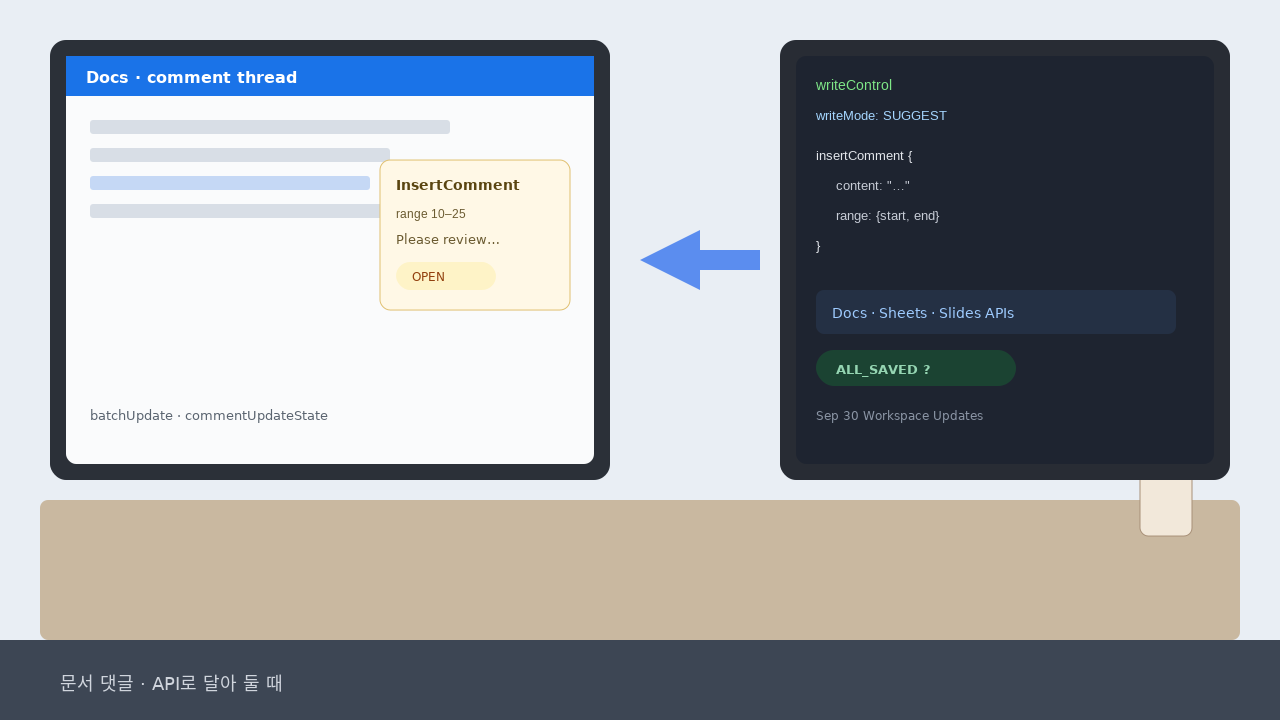
Docs 가이드 Create and manage comments는 documents.batchUpdate로 댓글·답글을 추가·수정·삭제한다고 적습니다. InsertCommentRequest로 스레드를 넣습니다. content와 anchor location(range의 startIndex·endIndex)이 필요합니다. 샘플 JSON은 content에 "This is a comment added via the API.", range startIndex 10, endIndex 25를 둡니다. 특정 사용자에게 맡기려면 assigneeEmailAddress에 이메일을 넣습니다. 샘플은 "Please review this paragraph."와 user@example.com입니다.
documents.batchUpdate
→ insertComment
   content
   range.startIndex / range.endIndex
   assigneeEmailAddress (선택)

→ addCommentReply
   commentId
   post.content
   post.commentAction: RESOLVE | REOPEN (선택)
   post.assigneeEmail (재할당, 선택)

→ updateCommentPost / deleteComment / deleteCommentReply
AddCommentReplyRequest는 답글이거나 RESOLVE·REOPEN 같은 commentAction입니다. RESOLVE 샘플은 content 없이 commentAction만 둡니다. UpdateCommentPostRequest는 내가 쓴 post의 본문을 고칩니다. commentId 또는 suggestionId, postId, 새 plain text content가 필요합니다. 가이드는 suggestion thread의 head post는 suggest-mode edits가 만들므로 편집할 수 없다고 적습니다. DeleteCommentRequest는 head post 작성자만 스레드 전체를 지울 수 있고, DeleteCommentReplyRequest는 내가 쓴 답글만, commentAction이나 assignee가 들어 있는 reply post는 못 지운다고 적습니다.
읽기 쪽은 documents.get입니다. SuggestionsViewMode로 미해결 제안을 본문에 어떻게 펼칠지 고릅니다. SUGGESTIONS_INLINE이면 삭제·삽입 대기 텍스트가 본문에 보이고, 제안을 모두 수락한 preview, 모두 거절한 preview도 있습니다. commentsViewMode를 COMMENTS_VIEW_MODE_INCLUDED로 둘 때는 suggestionsViewMode를 SUGGESTIONS_INLINE으로 맞춰야 하고, includeTabsContent도 true여야 한다고 가이드가 적습니다. 인덱스가 제안 포함 여부에 따라 달라지므로, 이어질 batchUpdate에 쓸 인덱스는 SUGGESTIONS_INLINE으로 받은 버전만 쓰라고 가이드가 못 박습니다. 미리보기 모드로 받은 startIndex를 그대로 insertComment range에 넣으면 어긋날 수 있습니다.
제안 모드와 commentUpdateState
Docs만 Updates가 suggested edits를 따로 적습니다. writeControl.writeMode를 SUGGEST로 두면 batchUpdate의 업데이트가 직접 편집이 아니라 제안으로 들어갑니다. 샘플은 insertText와 writeControl.writeMode: "SUGGEST"를 같이 둡니다. AcceptSuggestionRequest·RejectSuggestionRequest·DeleteSuggestionRequest로 스레드를 수락·거절·삭제합니다. Accept는 문서 edit access, Reject는 edit access 또는 제안 작성자, Delete는 제안 작성자가 필요하다고 가이드가 적습니다.
Unsupported requests in suggest mode 목록도 가이드에 있습니다. AddDocumentTab, CreateNamedRange, DeleteFooter, DeleteHeader, DeleteNamedRange, DeleteTab, UpdateDocumentTabProperties, UpdateTableColumnProperties는 SUGGEST에서 오류가 납니다. UpdateDocumentStyle에서도 documentFormat, useEvenPageHeaderFooter, useFirstPageHeaderFooter 제안은 지원되지 않습니다. 자동화 파이프라인이 “문서 탭 추가 + 본문 제안”을 한 batch에 넣었다면, 제안 모드와 탭 변경을 나누는 쪽이 문서와 맞습니다.
Comment and suggestion update status가 이 글에서 제일 자주 나를 구합니다. 댓글·제안 저장이 부분 실패할 수 있고, 그 경우 본문 모델 변경(텍스트 삽입·삭제)은 커밋됐는데 연관 댓글·제안만 실패할 수 있다고 가이드가 적습니다. BatchUpdateDocumentResponse의 commentUpdateState를 봅니다. NO_UPDATES_REQUESTED, ALL_SAVED, ALL_FAILED_UNKNOWN_REASON. ALL_FAILED_UNKNOWN_REASON이면 “본문은 바뀌었는데 스레드가 없다”는 상태가 될 수 있습니다. 파이프라인 로그에 commentUpdateState를 남기지 않으면, 다음 사람이 UI만 보고 API가 조용히 실패한 줄 모릅니다.
Sheets·Slides에서 앵커가 다른 점
Sheets Manage comments는 spreadsheets.get에 commentsViewMode=COMMENTS_VIEW_MODE_INCLUDED를 넣고, fields에 comments와 sheets(properties, commentAnchors)를 달라고 적습니다. 응답에서 전역 comments 배열과 sheets.commentAnchors가 갈립니다. commentAnchors가 anchorId를 grid range(행·열 인덱스)에 매핑합니다. InsertCommentRequest는 content와 GridCoordinate(sheetId, rowIndex, columnIndex)가 필요합니다. 샘플은 sheetId 0, rowIndex 1, columnIndex 1 — 즉 B2 셀 — 에 "This is a comment added using the API."를 달습니다. 답글·RESOLVE·재할당·수정·삭제 요청 이름은 Docs와 같은 계열(AddCommentReplyRequest, UpdateCommentPostRequest, DeleteCommentRequest, DeleteCommentReplyRequest)입니다. spreadsheets.batchUpdate 응답의 commentUpdateState도 ALL_SAVED / ALL_FAILED_UNKNOWN_REASON을 봅니다.
Updates Resources가 가리키는 개발자 문서 세 링크는 제품마다 가이드 제목이 다릅니다. Docs는 comments and suggestions를 한 페이지에 두고, Sheets·Slides는 Manage comments입니다. 나는 온보딩 위키에 “Docs만 SUGGEST·AcceptSuggestion” 한 줄을 굵게 남겨, Sheets 셀 댓글 자동화 티켓에 제안 API를 끌어오지 않게 합니다. 권한 오류가 나면 Updates Getting started대로 사용자 계정의 타사 앱 연결(Google Account & apps from other developers)과 관리자의 Workspace 데이터 접근 통제를 먼저 봅니다. 콘솔에 새 토글이 생겼다고 가정하고 메뉴를 헤매지 않습니다.
range나 sheet로 get을 거르면 그 안에 앵커된 스레드만 돌아옵니다. 원본 셀이 지워져 unanchored가 된 댓글은 필터를 켠 응답에 안 들어간다고 가이드가 적습니다. 필터 없이 전체를 받을 때만 unanchored도 포함됩니다. 나는 삭제된 행에 달린 피드백을 감사할 때, 필터 없는 get을 한 번 더 도는 습관을 메모에 둡니다.
Slides Manage comments는 presentations.batchUpdate입니다. InsertCommentRequest의 앵커는 objectId(슬라이드 또는 page element), 도형 텍스트 구간의 textRangeAnchor, 표 셀 텍스트의 tableCellTextAnchor, 표 셀 범위의 tableAnchor 중 하나라고 가이드가 적습니다. Docs의 startIndex·endIndex 본문 좌표, Sheets의 GridCoordinate와 섞지 않습니다. 제품마다 앵커 스키마가 다르다는 점이 오늘 발표를 “댓글 API 하나로 끝”으로 요약하지 못하게 막습니다. commentUpdateState 확인은 presentations.batchUpdate 응답에서도 동일하게 적혀 있습니다.
안 실리는 것과 1인 습관
첫째, MCP 서버의 programmatic comment는 Updates가 명시한 대로 developer preview로 남습니다. API 발표와 MCP preview를 같은 릴리스 노트 한 줄로 쓰지 않습니다. 둘째, Docs의 suggestions(writeMode SUGGEST, Accept/Reject)는 Updates Key capabilities와 Docs 가이드에 있고, Sheets·Slides 가이드 제목은 Manage comments입니다. Sheets·Slides에 Docs와 같은 suggested edits API가 열린 것처럼 확장해 쓰지 않습니다. 셋째, commentUpdateState를 무시하면 본문만 바뀌고 스레드가 비는 부분 실패를 놓칩니다. 넷째, Docs에서 이을 인덱스는 SUGGESTIONS_INLINE으로 받은 값이어야 합니다.
출퇴근용으로 적어 두는 최소 재현은 이렇게 잡습니다. Docs 테스트 문서에 insertComment 한 번, 이어서 addCommentReply로 RESOLVE 한 번, 응답의 commentUpdateState가 ALL_SAVED인지 확인. 그다음 같은 문서에 writeMode SUGGEST로 insertText를 넣고 AcceptSuggestionRequest로 닫습니다. Sheets는 B2에 insertComment 후 commentsViewMode=COMMENTS_VIEW_MODE_INCLUDED get으로 commentAnchors와 comments가 같이 오는지 봅니다. Slides는 빈 슬라이드 objectId에 댓글을 단 뒤 presentations.get 계열로 스레드가 보이는지 확인합니다. 세 제품 응답을 한 JSON으로 합쳐 “통일 스키마”를 만들지 않습니다. 앵커 필드가 다르면 로그 키도 다르게 둡니다.
1인으로 쓸 때 습관 하나: 리뷰 봇이 Docs에 남기는 첫 스레드는 “직접 수정”이 아니라 insertComment 또는 writeMode SUGGEST로만 넣습니다. 배치 응답 로그에 commentUpdateState와, 실패 시 documentId·요청 종류를 한 줄로 남깁니다. Sheets면 coordinate(sheetId, row, column)를, Slides면 objectId 또는 어떤 anchor 종류를 썼는지 같이 적습니다. Rapid·Scheduled 모두 9월 30일부터 최대 15일 gradual이므로, 테넌트에 아직 404·권한 오류가 나면 “기능이 없다”고 단정하기 전에 rollout 창을 캘린더에 표시해 둡니다. OAuth 스코프와 앱 접근은 관리자가 막을 수 있다는 Updates Getting started 문장을 같은 체크리스트에 둡니다.
공식 출처는 Workspace Updates의 Programmatic comment and suggestion support now available in the Google Docs, Sheets, and Slides APIs(2026-09-30, as-fetched 2026-10-01)와 Docs Work with comments and suggestions, Sheets Manage comments, Slides Manage comments(모두 as-fetched 2026-10-01)입니다. 내부 리뷰 도구를 문서에 붙이다 막히면, 앵커 스키마·SUGGESTIONS_INLINE 인덱스·commentUpdateState·MCP preview 문장부터 맞춰 보면 됩니다.
케이알선 · 케이알선의 이야기
혼자 읽고, 만들고, 막힌 지점을 정리합니다. 공식 채널이 아닌 개인 기록입니다.


댓글