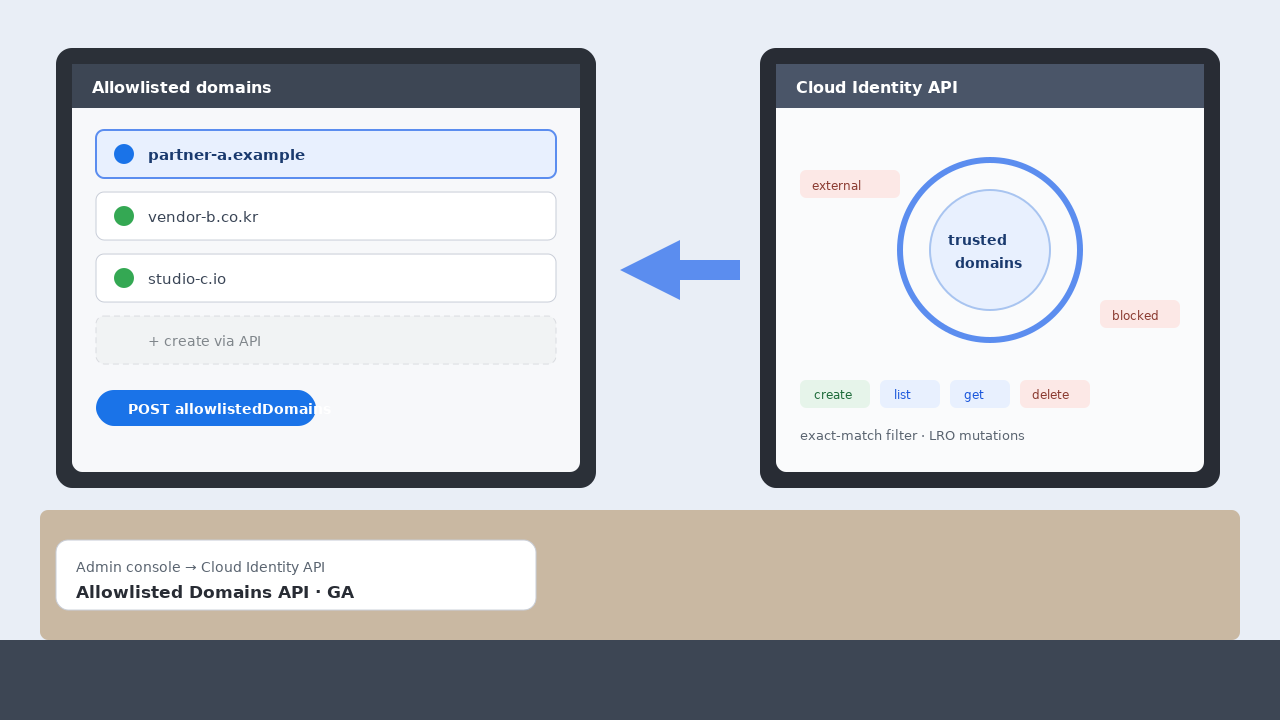
외부 공유를 막다가도, 파트너 회사 도메인만은 Drive·Docs 쪽에서 열어 줘야 하는 날이 있습니다. 그때마다 Admin console에서 허용 도메인 목록을 손으로 고치면, 누가 언제 넣었는지 나중에 다시 찾기 어렵고, 스크립트로 검증할 방법도 없습니다. 아침에 정리한 Vids TTS 이야기와는 층이 다릅니다. 그날은 보이스오버 엔진이었고, 오늘은 Workspace 허용 도메인을 Cloud Identity API로 다루는 자리만 남깁니다.
2026년 8월 20일 Workspace Updates에 Allowlisted Domains API now generally available가 올라왔습니다. 2026-09-30 점심에 Updates와 Cloud Identity 문서(overview·setup·create·list/get·delete·audit logs)를 다시 읽었습니다. 예전에는 관리자가 Google Workspace Admin console에서 허용 도메인 목록을 수동으로 관리했다고 Updates가 적습니다. 이번 출시는 Cloud Identity API suite의 top-level resource로 호스팅되며, 허용 도메인 목록을 프로그래밍 방식으로 안전하게 자동화할 수 있게 한다는 문장입니다. “공유 정책이 전부 API로 바뀌었다”로 뭉개지 않겠습니다. 허용 도메인 CRUD와 exact-match 필터, 그리고 아직 안 되는 자리만 적습니다.
Previously, administrators had to manage their allowlisted domains list manually through the Google Workspace Admin console. With this release, hosted under the Cloud Identity API suite as a top-level resource, organizations can securely automate and programmatically manage their list of allowlisted domains.
Updates가 적어 둔 범위
Core CRUD는 Create, Delete, List, Get입니다. List API에서 exact-match filtering으로 특정 도메인이 있는지 확인할 수 있다고 Updates가 적습니다. Note 한 줄이 중요합니다. Reseller-managed workflows are not currently supported. Getting started도 짧습니다. Admins: API로 규칙을 구성하려면 Google Workspace에 대한 domain management 또는 domain allowlist management privileges가 필요합니다. End users: There is no end-user setting or action required for this feature. 엔드유저가 켜는 스위치는 없습니다. Rollout은 Rapid Release와 Scheduled Release 모두 Gradual rollout(최대 15일)이며 2026년 8월 19일부터 시작했다고 Updates가 적습니다. Availability는 Available to all Google Workspace customers입니다. “우리만 아직”이라고 단정하기 전에, 권한·직접 고객(direct customer) 조건·실제 API 응답을 먼저 맞춰 봅니다.
Cloud Identity overview 문서의 Limitations도 같이 둡니다. No bulk operations — 한 번의 API 호출로 bulk create/delete는 지원되지 않습니다. Concurrent mutations for the same customer aren't supported — 각 mutation은 LRO를 반환하고, 같은 고객의 기존 LRO가 끝날 때까지 다음 mutation을 시작하지 말라고 적습니다. Pagination aborts — 도메인 mutation이 있으면 진행 중이던 paginated list는 ABORTED로 끊기고 처음부터 다시 시작해야 합니다. Scope — Initial support for the API is restricted to direct customers. Reseller-managed workflows are not supported. Updates Note와 overview Scope가 같은 방향을 가리킵니다.
Setup에서 맞추는 클릭 경로
문서 Set up the Allowlisted Domains API(Last updated 2026-09-24 UTC, as-fetched 2026-09-30) 기준으로, 쓰기 전에 맞출 자리는 아래와 같습니다. UI 라벨은 오늘 읽은 문서에 나온 것만 씁니다.
Google Cloud console
→ 프로젝트 선택 또는 생성
→ Cloud Identity API Enable
→ Create service account
   → Keys → Add key → Create new key (JSON)
→ Credentials → Create Credentials → API key
→ domain-wide delegation
   scopes:
   https://www.googleapis.com/auth/cloud-identity.allowlisteddomains
   https://www.googleapis.com/auth/cloud-identity.allowlisteddomains.readonly
→ 코드에서 with_subject(delegated_email)
읽기·쓰기(create, delete, list, get)는 cloud-identity.allowlisteddomains scope, 읽기 전용(list, get)은 .readonly입니다. Python 예시는 discovery URL https://cloudidentity.googleapis.com/$discovery/rest와 service account JSON, API_KEY, delegated_email을 같이 씁니다. domain-wide delegation은 서비스 계정이 관리자를 impersonate하므로, 문서가 best practices를 따로 보라고 적습니다. 권한이 없으면 PERMISSION_DENIED(403) “Permission denied for allowlisted domain resource.”가 나온다고 create/list/delete 문서가 공통으로 적습니다. scope만 넣고 Admin 쪽 domain management·domain allowlist management 권한이 비어 있으면 같은 403에 걸립니다.
서비스 계정 JSON을 받은 뒤에도, Admin console의 API 제어에서 Client ID에 위 scope를 등록하지 않으면 with_subject로 위임해도 막히는 경우가 있습니다. Setup 문서가 Control API access with domain-wide delegation을 따로 보라고 적어 둔 이유가 여기입니다. API key는 discovery URL에 query로 붙는 YOUR_API_KEY 자리이고, 실제 allowlistedDomains 호출의 신원은 delegated 관리자 쪽에 가깝게 읽습니다. Owner 역할을 서비스 계정에 주는 단계는 quickstart식 안내이므로, 운영 프로젝트에서는 least privilege로 다시 조이는 편이 안전합니다. 이 글에서는 문서가 적은 라벨만 따르고, IAM을 새로 설계하지는 않습니다.
create · list · get · delete
Adding a domain to the allowlist 문서의 create는 payload에 domain만 넣습니다. mutation은 비동기이고 LRO를 반환합니다. Key considerations: domain names cannot be modified — 이름을 고치려면 기존 항목을 delete한 뒤 새로 create합니다. Throughput은 고객당 대략 1 QPS shared. Capacity는 고객당 최대 5,000 domains. 제한에 걸리면 FAILED_PRECONDITION “Allowlisted domain limit has been reached.”입니다. 이미 mutation이 진행 중이면 “An allowlist update is already in progress…”입니다. Restricted domains로 aol.com, gmail.com, hotmail.com, mail.ru, outlook.com, web.de, yahoo.com, yandex.com, yandex.ru는 allowlist에 넣을 수 없다고 create 문서가 명시합니다. 소비자 메일 도메인을 파트너로 넣으려다 INVALID_ARGUMENT에 막히는 자리를 메모해 둡니다.
def create_allowlisted_domain(service, domain_name):
  payload = {'domain': domain_name}
  return service.allowlistedDomains().create(body=payload).execute()

# list filter — exact match only
# filter="domain = 'google.com'"
# composite AND/OR/NOT 미지원, '=' 와 domain 필드만

def delete_allowlisted_domain(service, resource_name):
  # name = allowlistedDomains/UNIQUE_IDENTIFIER
  # list 응답의 Output only name을 그대로 쓴다
  return service.allowlistedDomains().delete(name=resource_name).execute()
Listing and getting allowlisted domains 문서는 list에 pageSize, pageToken, filter를 쓸 수 있다고 적습니다. Filtering only supports exact matches on the domain string. Composite conditions are not supported. get은 이전 list에서 받은 resource name으로 동기 조회합니다. delete도 resource name이 필요하고, 문서는 Don’t construct or guess the resource name — list에서 받은 Output only 식별자를 쓰라고 적습니다. 형식이 틀리면 INVALID_ARGUMENT “Invalid resource name…”, 목록에 없으면 NOT_FOUND “Allowlisted domain <domain> not found.”입니다. list 도중에 다른 mutation이 끼면 ABORTED “List has been mutated. Please restart pagination.”이 뜹니다. 병렬로 create를 돌리면서 list를 페이지네이션하면 중간에 끊깁니다.
create 응답을 받는 즉시 list가 갱신됐다고 가정하지 않습니다. mutation이 LRO인 이상, 완료 전에 같은 고객으로 또 create를 넣으면 FAILED_PRECONDITION이 납니다. 파트너 도메인 세 곳을 넣어야 하면 스크립트에 sleep을 대충 넣기보다, LRO가 끝난 뒤에만 다음 domain을 넣는 쪽이 문서 제약과 맞습니다. get은 list에서 받은 name이 있을 때 쓰는 동기 조회이고, domain 문자열만으로 get path를 조립하지 말라고 delete 문서가 못 박습니다. “도메인 이름으로 DELETE URL을 추측”하면 Invalid resource name에 걸립니다.
REST 표면은 setup 문서가 요약한 대로 POST/GET https://cloudidentity.googleapis.com/v1/allowlistedDomains, 개별 리소스는 name=allowlistedDomains/* 형태입니다. Python discovery client 예시는 serviceName=None, version=None, discoveryServiceUrl에 version·key를 붙이고 static_discovery=False입니다. 클라이언트를 직접 짜더라도 filter 문법은 list 문서 예시 GET .../v1/allowlistedDomains?filter="domain = 'google.com'"를 그대로 따릅니다. 따옴표·공백이 어긋나면 Invalid filter expression 쪽으로 떨어집니다.
감사 로그로 확인하는 자리
Viewing audit logs 문서 기준입니다. Allowlisted Domains API로 만든 create·delete는 backend에 Add trusted domains / Remove trusted domains activity type으로 남는다고 적습니다. 관리자는 최근 6개월 추가·삭제를 검증할 수 있습니다. 클릭 경로는 다음과 같습니다.
Google Admin console
→ Menu → Security → Security center → Investigation tool
  (Security center administrator privilege 필요)
→ Data source: Admin log events
→ Add Condition
→ Event Is → Add trusted domains 또는 Remove trusted domains
→ Search
API만 성공 응답을 보고 끝내면, 나중에 “누가 넣었지?”를 다시 콘솔에서 헤매게 됩니다. Investigation tool 조건까지 메모에 같이 두는 편이 덜 헷갈렸습니다. Vids나 Drive Gemini 글처럼 엔드유저 화면을 만지는 이야기와 결이 다릅니다. 여기는 Admin·API·감사 로그 층입니다.
안 실리는 것과 막히는 지점
Reseller 워크플로는 현재 지원되지 않습니다. bulk create/delete 한 방 호출도 없습니다. 같은 고객에 대한 concurrent mutation도 없습니다. 도메인 이름 in-place update도 없고 delete 후 create입니다. 엔드유저 설정은 없습니다. Updates Resources가 가리키는 overview와 setup·create·list/get·delete를 열어보면, “콘솔 UI가 API와 1:1로 새로 생겼다”는 문장은 없습니다. 자동화 대상은 allowlisted domains 리소스입니다. 외부 공유 정책의 전체·Drive 공유 다이얼로그의 모든 옵션이 API 한 줄로 바뀐다고 쓰지 않습니다. 허용 목록에 도메인을 넣어도, 조직의 공유 설정·그룹·OU 정책이 따로 막혀 있으면 체감 공유는 그대로일 수 있습니다. 그 상위 정책 문장까지 이 글에서 새로 쓰지 않습니다. 오늘은 allowlisted domains 리소스의 자동화 경계만 남깁니다.
403이면 scope와 domain management / domain allowlist management 권한을 다시 봅니다. 404 Customer ID not found면 delegated 사용자가 유효 도메인에 연결돼 있는지 봅니다. create가 FAILED_PRECONDITION이면 이전 LRO가 끝났는지·5,000개 한도인지부터 가릅니다. list filter에 AND를 넣으면 Composite conditions not supported입니다. 소비성 메일 도메인을 넣으면 restricted domains 목록에 걸립니다.
1인으로 쓸 때 습관 하나
나는 파트너 도메인을 넣을 때 “list filter로 이미 있는지 exact-match 확인 → 없으면 create → LRO 완료 대기 → 다시 list/get으로 name 확인 → Admin Investigation tool에서 Add trusted domains 검색” 순서를 메모에 고정합니다. delete가 필요하면 list에서 받은 allowlistedDomains/… name만 쓰고, 문자열을 손으로 조립하지 않습니다. 한 번에 여러 도메인을 넣고 싶어도 overview가 bulk를 막아 두었으니, 스크립트는 순차 create + LRO wait로 돌립니다. Reseller 계정으로 고객 테넌트를 대신 만지는 자리면 지금 API 범위 밖이라고 Updates·overview가 같이 말합니다. 1인·소규모 직접 Workspace 고객이 자기 허용 목록을 코드로 맞출 때 쓰는 도구로 읽습니다.
소규모로 Workspace를 쓰는 자리에서는 허용 도메인 개수가 많지 않아도, “콘솔에서 누가 클릭했는지”가 안 남는 게 더 불편했습니다. API create 뒤에 Investigation tool 조건을 한 번 저장해 두면, 6개월 안 Add trusted domains / Remove trusted domains를 같은 경로로 다시 열 수 있습니다. Security center administrator privilege가 없는 계정으로는 Investigation tool 자체가 안 열리니, API 권한과 감사 조회 권한을 한 묶음으로 적어 둡니다. 데모용으로 gmail.com을 넣어 보고 싶어도 restricted 목록에 있어 실패합니다. 테스트는 소유한 하위 도메인이나 실제로 협업하는 회사 도메인으로만 합니다.
공식 출처는 Workspace Updates의 Allowlisted Domains API now generally available(2026-08-20, as-fetched 2026-09-30)와 Cloud Identity 문서 Allowlisted Domains API overview, Set up the Allowlisted Domains API(Last updated 2026-09-24 UTC), Adding a domain to the allowlist, Listing and getting allowlisted domains, Removing a domain from the allowlist, Viewing audit logs(as-fetched 2026-09-30)입니다. Admin console에서만 허용 도메인을 고치다 막히면, 권한·LRO·exact-match filter·reseller 제외부터 맞춰 보면 됩니다.
케이알선 · 케이알선의 이야기
혼자 읽고, 만들고, 막힌 지점을 정리합니다. 공식 채널이 아닌 개인 기록입니다.


댓글